Steam store pages show average Steam Deck frame rates from November 10
Valve added player-reported average fps and a frame rate histogram to Steam Deck compatibility info on November 10, built from opt-in data from Deck owners.
By ElvisPublished
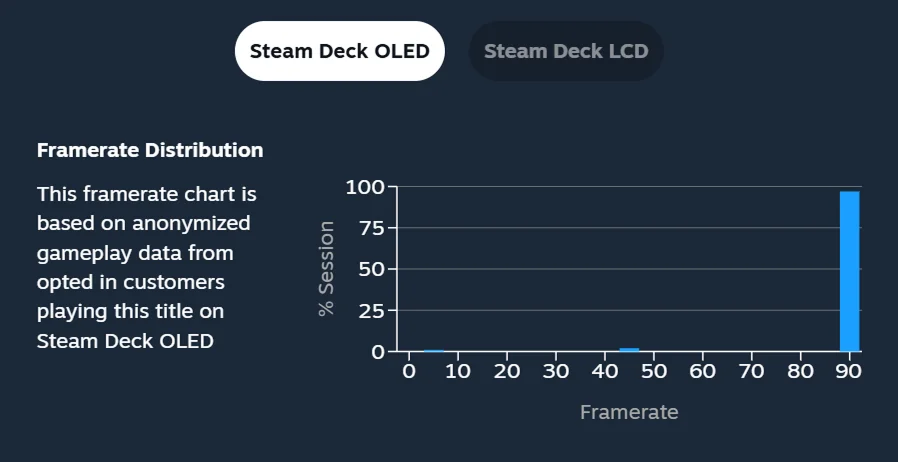
Valve started showing the average frame rate Steam Deck players get in each game on November 10, in a Steam blog post that went with that day’s update. The numbers come from Deck owners who opted in to sharing anonymized frame rate data, and they apply to games Valve has rated for Deck compatibility, whether the rating is Verified, Playable or Unsupported, once a game has enough samples. Valve says thousands of games had data on launch day. A note added to the post on November 11 says the data is live for everyone on the Steam store and in the Steam client, on desktop and on the Deck.
Where to find it
On a game’s store page, open Steam Deck Compatibility and click “Learn more”. The panel shows the average fps, and an expandable view adds a histogram: the share of data samples at each frame rate. According to Valve, a game that hitches or stutters will have short bars at the low end of that chart. When the post first went up, the same data in the Steam Library was limited to the Steam Client Beta.
Games with few players get nothing. Valve only shows averages and histograms once a game passes a minimum number of data points, without saying what that minimum is.
What the numbers do and don’t count
Valve only counts Decks left at their default frame limit: 60 fps on the Steam Deck LCD and 90 fps on the Steam Deck OLED. In-game graphics settings aren’t tracked at all, which Valve justifies by saying the samples still cluster in fairly narrow ranges. Valve strips out idle time and invalid samples, and takes more than one sample from each play session.
Going by that description, a Deck capped at 30 or 40 fps through the system frame limiter doesn’t feed the averages. Valve doesn’t say so, but a game capped at 30 fps in its own options menu would presumably still count.
Some histograms have a large gap between two frame rates; Valve’s example is 90 and 45. Valve blames VSync, which avoids tearing by tying frames to the display’s refresh: on a 90 Hz screen, a frame that misses its slot is shown at the 45 fps rate instead, so a game that really averages 75 fps shows up as a mix of 90 and 45. Games with their own 60 fps cap land in the same split on an OLED at its default setting.
Early examples from the press: PC Gamer looked up Elden Ring and found a 42 fps average on the OLED and 38 fps on the LCD, with the LCD samples mostly at either 30 or 60. Windows Central found a 33 fps average for The Elder Scrolls IV: Oblivion Remastered on the LCD, with most samples at 30 fps and a smaller spike at 60.
Why Valve did it, and the catch
The Verified badge comes from a fixed checklist, and Valve says players draw the line for acceptable performance in different places: some will happily play an Unsupported game, others won’t accept the frame rate of a Verified one. An average fps figure next to the badge gives a buyer a number to judge by before paying. Valve also says a majority of Deck players have opted in.
Steam Deck HQ, a Deck-focused site, called the feature a step in the right direction but argued in an opinion piece that an average can mislead. Its points: nobody can see what settings or mods players used, a game’s early areas can run better than the later ones, and menus running at 90 fps seem to land in the data. Its example is Phantom Blade Zero, listed at a 43 fps average even though most of the game, by Steam Deck HQ’s account, sits at an unstable 30 fps. Our Steam Deck performance settings guide covers the frame limiter and refresh rate controls behind these numbers.
Other handhelds
As of Valve’s November 10 post, the data covers the Steam Deck only. Valve says it began there because every Deck has the same hardware, and it calls the feature a stepping stone toward frame rate data for more devices. The same post says the Steam desktop client had started asking for the opt-in on the Steam Client Beta, with all users to follow later. It names no other device and gives no date. That leaves owners of a ROG Xbox Ally X, Legion Go 2 or other Windows and SteamOS handhelds without numbers for their own hardware. PC Gamer suggests reading a Deck average as a floor if your handheld is more powerful. Owners can switch sharing on or off under Steam Account Settings > Data & Browsing > Anonymous Game Framerate Data.
Sources
- Average framerate data is now available for games on Steam Deck · Valve
- Steam now lets you see exactly what frame rate you should get in games using a Steam Deck · PC Gamer
- The Steam Deck Verified badge has burned me before — Valve aims to change that with new average FPS data for most of its games · Windows Central
- Valve's New Steam Deck Framerate Data Does More Harm Than Good · Steam Deck HQ
Spotted a mistake? Tell us and we'll correct it.